There are already good ways to run a language model on your own computer. llama.cpp runs almost everything, everywhere. Microsoft maintains bitnet.cpp for its ternary models, and PrismML maintains a llama.cpp fork for its ternary Bonsai models. Ollama, LM Studio and others put a friendly interface on top.
So when I tell people I am writing my own inference engine, the most common reaction is a polite version of: why?
My answer starts with a goal. I want good language models to run on the hardware people already own: a Raspberry Pi, a laptop, a gaming PC with one graphics card. That hardware has little memory, so a model has to shrink, or be spread cleverly over what is there.
And here is the puzzle that made me start. The most compressed language models you can download today, the ternary ones, whose weights are only −1, 0 or +1, come in three formats. Apart from the one I am writing, no inference engine reads all three. The engines we have were not built for this goal.
So the short version: I want an alternative to llama.cpp that is built for one thing, making models small and fast enough for consumer hardware. Not another engine for everything, but the best engine I can make for this.
I will start with the very basics, so that you can follow even if you have never thought about what happens between “model file” and “text on the screen”. Each section then goes one level deeper. Stop wherever you have enough.
Here is the plan:
- Level 1: What an inference engine is.
- Level 2: The short answer: compressed models on small hardware.
- Level 3: Where geistlib stands, in numbers, on ternary models.
- Level 4: Four design decisions that follow from that focus.
- Level 5: The ternary oracle problem, the detail that convinced me.
At the end, I compare what you actually ship, list what the focus rules out, because it is not free, and ask whether all of this is worth it.
Level 1: What is an inference engine?
A language model, at rest, is just a large file. It contains numbers, called weights, and a description of how they are connected. The BitNet b1.58 2B-4T model I use as a reference is about 1.2 GB on disk. By itself, that file does nothing.
An inference engine is the program that brings the file to life. It does three things:
- Load the weights into memory.
- Read your prompt and turn it into tokens, small pieces of text the model understands. Processing the whole prompt at once is called prefill.
- Generate the answer, one token at a time. Each new token needs a full pass through the model. This step is called decode.
That is all an inference engine is. No chat window, no account, no cloud. It loads a model and produces tokens.
Level 2: The short answer
Here is the core reason in one sentence:
A general engine is optimized to run every model on every machine. geistlib is optimized to make models run as fast and as efficiently as possible on small consumer hardware, by compressing them and scheduling them well, and to make every design choice measurable.
Three ways to fit a model onto small hardware
On small hardware, two resources run out first: memory capacity, which decides whether a model loads at all, and memory bandwidth, which decides how fast it decodes (Level 3). An engine can work on both in three places:
- Weights. Decode streams every weight once per token, so the bits per
weight set both the model size and the decode speed.
PQ2_0, for example, stores each ternary weight in 2 bits plus one 16-bit scale per 128 weights, 2.125 bits per weight: the 27 billion parameters of Bonsai take 7.2 GB instead of about 54 GB at 16 bits. geistlib runs the three ternary formats with integer kernels, and the common 4- and 8-bit formats for other models. Binary weights, 1 bit each, are the next step. - The KV cache. For every token in the context, each attention layer stores a key and a value vector. This cache grows linearly with the context and is read on every decode step. geistlib can keep it in FP32, F16 (on GPUs), INT8, INT4 or KIVI, which quantizes keys per channel and values per token and keeps the newest tokens unquantized. These modes are still experimental.
- Placement. When a model does not fit on the GPU, the engine decides which layers live in GPU memory and which in system memory, and which processor computes them. geistlib splits a model by layer between one GPU and the CPU, fixed at load time (#49). On Vulkan, weights that do not fit in GPU memory are copied into it for a long prompt instead of being read over the bus: on Qwen3-14B Q8_0 on an RTX 2080 Ti, with 4.7 GB not fitting, that raised prefill from 177 to 550 tokens/s (#78). Keeping the frequently used experts of a mixture-of-experts model on the GPU is not implemented yet.
geistlib works on all three. Weights are the furthest along, so the rest of this article is mostly about them.
What a ternary model is
In a ternary model, every weight is one of three values: −1, 0 or +1. Three values need about 1.58 bits of storage. A typical small model stores its weights in 16 bits and is compressed to 4 or 8 bits afterwards, which costs some quality. Ternary models like Microsoft’s BitNet b1.58 are trained with ternary weights from the start, so nothing is lost in a later conversion step. Others, like PrismML’s Ternary Bonsai 2 27B, are derived from a full-precision model, here Qwen3.8-27B.
Ternary weights fit small hardware unusually well:
- They fit. BitNet b1.58 2B-4T is about 1.2 GB, small enough for a 4 GB Raspberry Pi with room to spare. Bonsai 27B is 7.2 GB.
- They move few bytes. Generating text on small hardware is limited by how fast weights come out of memory (Level 3). Fewer bits per weight means fewer bytes per token.
- They need little arithmetic. Multiplying by −1, 0 or +1 is a subtraction, nothing or an addition. Kernels can work on packed integers instead of floating-point numbers.
Why not just llama.cpp?
Because for the most compressed models, there is no single llama.cpp.
The ternary models that exist today come in three formats, and each one
lives in a different engine. llama.cpp’s mainline reads TQ1_0 and TQ2_0.
Microsoft’s BitNet b1.58 2B-4T ships as i2_s, which only bitnet.cpp reads,
a fork of llama.cpp. PrismML’s Ternary Bonsai 2 27B ships as PQ2_0, which
only PrismML’s own fork of llama.cpp reads. Even the people who build the
models forked the engine instead of waiting for the mainline. So to run the
ternary models of today, you need more than one engine, each tuned for its
own format and each carrying the rest of llama.cpp with it.
geistlib runs all three formats in one library, with native kernels for each, and it is faster than each format’s own engine where it counts most for a user: in decode, the step you wait for while the answer appears. Level 3 has the numbers.
There is also a deeper reason. In a general engine, low-bit weights are one quantization type among dozens, and fitting a model onto one small GPU and a CPU is one use case among many. The questions they raise stay side topics. Level 5 shows one of them: for ternary weights, even the meaning of “correct” changes. In geistlib, these questions are the main topic.
So geistlib starts from a deliberately narrow scope:
- In scope: compressed models, ternary, binary and other low-bit formats, on small consumer hardware: an ARM board, a laptop CPU, Apple silicon, a single consumer GPU, and models larger than that GPU, scheduled across the GPU and the CPU; a library embedded in someone else’s product. Every optimization is measured on these.
- Out of scope: several GPUs per model, data-center serving and the long tail of model architectures.
Level 3: Where geistlib stands, in numbers
My reference machine is a Raspberry Pi 5 with 4 GB of memory. It has four ARM cores and no usable GPU for this work. On a board like this, there is nowhere for inefficient software to hide. The other machines are consumer hardware too: a 2021 MacBook Pro with an M1 Max, and a desktop with a Ryzen 9 9950X and an RTX 2080 Ti. Both are large enough for a 27B ternary model. The numbers below are for ternary models, because that is where the engine is furthest along.
Prefill and decode are two different problems
Before the numbers, one distinction matters more than any other.
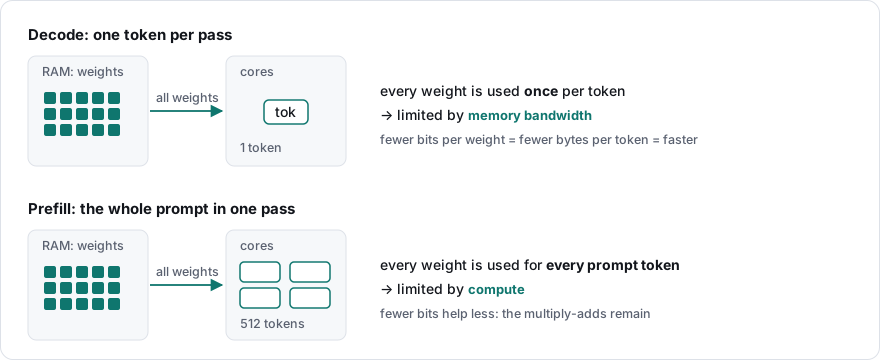
- Decode produces one token at a time. For each token, the engine reads every weight of the model once and does comparatively little arithmetic with it. Decode is therefore limited by memory bandwidth: how many bytes per second the board can move from RAM to the cores.
- Prefill processes the whole prompt at once. Each weight is read once and then used for many tokens, so there is much more arithmetic per byte. Prefill is therefore limited by compute: how many multiply-adds the cores can do per second.
This is why ternary weights help decode more than prefill. A ternary weight takes about 1.58 bits instead of 4 or 16, so the engine moves fewer bytes per generated token. The arithmetic of a prefill does not shrink in the same way.
The numbers
Every row compares geistlib with the engine that is the reference for that format, in the same run: same machine, same GGUF file, greedy decoding.
| Model and format | Machine | Baseline | Decode | Prefill |
|---|---|---|---|---|
BitNet 2B-4T i2_s |
Pi 5 | bitnet.cpp | 19.2 vs 9.4 tok/s, 2.0× | 47.1 vs 47.5, 0.99× |
bitnetb158-large TQ2_0 |
Pi 5 | llama.cpp | 48.4 vs 49.1 tok/s, 0.99× | 128.1 vs 51.6, 2.5× |
Ternary Bonsai 2 27B PQ2_0 |
M1 Max, CPU | PrismML fork | 11.2 vs 6.7 tok/s, 1.68× | 29.4 vs 22.5, 1.31× |
Ternary Bonsai 2 27B PQ2_0 |
Ryzen 9 9950X, CPU | PrismML fork | 8.89 vs 7.83 tok/s, 1.14× | 58.1 vs 45.4, 1.28× |
Ternary Bonsai 2 27B PQ2_0 |
RTX 2080 Ti, Vulkan | PrismML fork | 41.3 vs 30.0 tok/s, 1.38× | 648 vs 569, 1.14× |
Ternary Bonsai 2 27B PQ2_0 |
M1 Max, Metal | PrismML fork | 19.5 vs 16.9 tok/s, 1.15× | 113.2 vs 117.1, 0.97× |
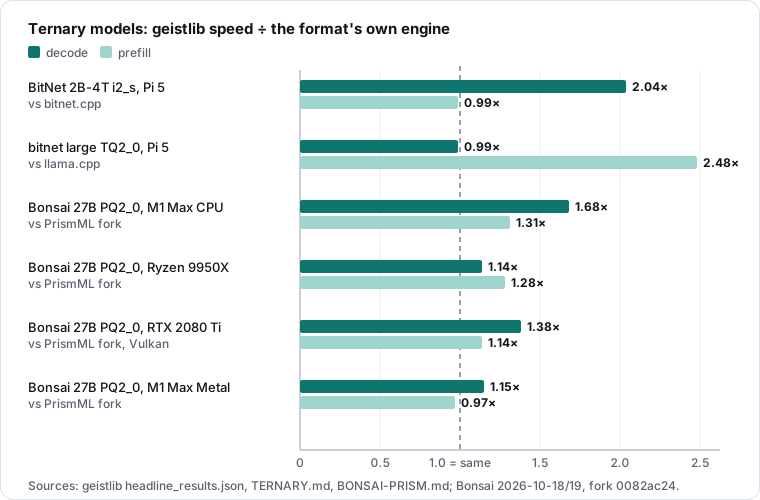
Three things matter here.
First, geistlib decodes faster on every machine, on every format except
TQ2_0: 2.0× on BitNet’s own format on the Pi, 1.14× to 1.68× on Bonsai on
the desktop and laptop CPUs, 1.38× and 1.15× on the two GPUs. That is what the distinction
above predicts for ternary weights, and decode is the step you feel when you
wait for an answer.
Second, the lead depends on the format. On TQ2_0, the ternary format
llama.cpp reads itself, decode is at parity, 48.4 against llama.cpp’s 49.1
tokens/s, with geistlib’s speculative output head turned off. For an engine built around low-bit models, parity
on a ternary format is a task, not a result.
Third, prefill is ahead or level, not ahead everywhere. geistlib is
ahead on TQ2_0 and on Bonsai on both CPUs and on Vulkan, and level with
bitnet.cpp on i2_s (0.99×) and with the fork on Metal (0.97×). The Metal
ratio is the least precise in the table: the fork’s Metal prefill spread
from 103 to 120 tokens/s between cycles.
I keep the weaker rows in the table on purpose. A benchmark that only shows
wins is an advertisement, not a measurement.
Level 4: Four design decisions that follow from the focus
Now we get into the code. geistlib is a C23 static library, libgeist.a, with
no runtime dependencies, about 161,000 lines of C.
Why C and not Rust? Not for speed, where the two tie, and not for safety,
where Rust wins. The reason is reach: the C header is the ABI, so
Python, Rust, Go and JavaScript call the library through their standard
foreign-function interface, and every toolchain, from small ARM boards to
GPU and NPU SDKs, speaks C first. geistlib pays for that with discipline:
warnings as errors, address, undefined-behavior and thread sanitizers in
CI, bit-exact golden tests. C23 helps, with nullptr, [[nodiscard]] on
every status a caller must check, and checked arithmetic for sizes read
from untrusted model files. None of this makes C memory-safe; it makes the
intent visible and lets the compiler catch more mistakes. The
architecture notes
give the full argument, including when Rust is the better choice.
Four decisions shape the code more than anything else. Each follows from the focus, and each is a choice llama.cpp reasonably makes differently for its broader scope.
Decision 1: Low-bit weights are a first-class data type
In a general engine, a low-bit format is one quantization type among
dozens. In geistlib, low-bit weights are the case the engine is designed
around. For ternary weights that is done: i2_s, TQ2_0 and PQ2_0 all
have native kernels that run integer dot products directly on the packed
weights, ARM SDOT on the Pi and Apple silicon, AVX-512 VNNI on x86. Binary
weights have their data type in the engine, but no kernels yet.
How much does that matter? The alternative is to expand the ternary weights to 32-bit floats and hand them to a general matrix routine. For the Bonsai prefill on the CPU, in direct A/B runs of the two paths, the integer kernels are 2.1× faster than that on the M1 Max (31.3 against 15.0 tokens/s, #83) and 1.6× faster on the Ryzen (58.1 against 35.7, #86). Same hardware, a different idea of what the “normal” data type is.
Decision 2: Decide everything expensive at load time
llama.cpp describes each batch as a compute graph. Its scheduler assigns the operations to devices, and the CPU backend picks each node’s implementation while the graph runs. That flexibility is what lets llama.cpp spread one model across several devices.
geistlib asks those questions once, when the model loads. For each weight tensor it looks at the operation, data type and memory layout, and binds a direct function pointer to the matching kernel. The decode loop then calls the bound kernels without switching on formats.
Decision 3: An engine, not an application
geistlib has no chat templates, no tool calling and no user interface; those belong to the program that links it. llama.cpp’s library applies chat templates, and the project ships a server and a chat program. An engine without product opinions can be embedded by anyone, from any language with an FFI (examples of 30 to 40 lines each).
The boundary also makes a fun trick possible: because weights are mapped read-only and never copied, the model can live inside the executable. BitNet 2B ships as one 1.2 GB file for the Pi (release v0.20.0):
curl -L -o geist-bitnet https://github.com/geisten/geistlib/releases/download/v0.20.0/geist-bitnet-linux-arm64
chmod +x geist-bitnet
./geist-bitnet "The capital of France is"
The one-file article explains how that works.
Decision 4: Shared code never asks which model it runs
llama.cpp keeps one file per model architecture, and so does geistlib. The difference is what the shared code knows. In llama.cpp it still asks which model it serves: 40 lines in its shared graph, context and KV-cache code name a specific architecture, for example Llama 4 in the shared mixture-of-experts function. Part of what a model does lives in its file, part in code that also serves 160 other architectures. For llama.cpp’s scope that is a sensible trade.
geistlib follows two rules instead:
- A shared block (normalization, projections, RoPE, attention, the KV cache, the FFN variants) knows how an operation runs, never which family calls it.
- A family file knows the order of the blocks, never the mechanics.
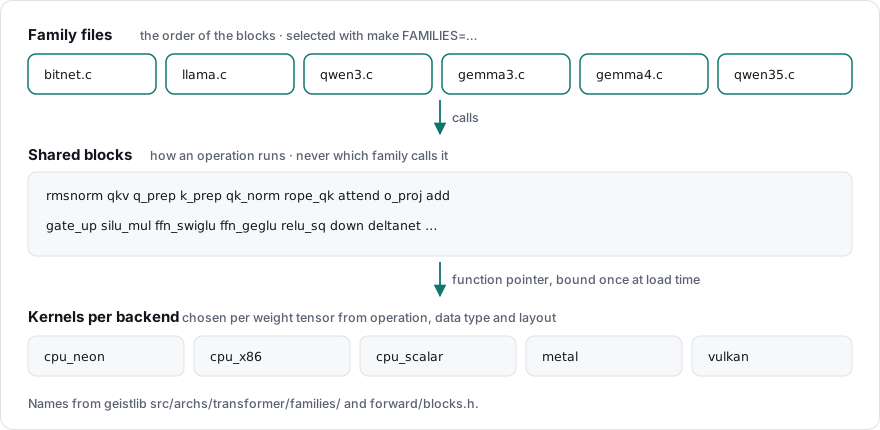
So the attention stage of BitNet reads like the diagram of a BitNet layer.
This is the complete function from families/bitnet.c:
[[nodiscard]] static enum geist_status
bitnet_attention_block(struct transformer_layer_forward_ctx *ctx) {
    struct transformer_arch_state    *st   = ctx->st;
    struct transformer_arch_session  *sess = ctx->sess;
    struct transformer_layer_weights *L    = ctx->L;
    const size_t                      d    = st->d_model;
    struct geist_buffer              *x    = sess->scratch_normed;

    enum geist_status s = blk_rmsnorm(ctx, d, ctx->h_in_buf, &L->attn_norm, x);
    if (s == GEIST_OK)
        bitnet_input_quant(ctx, x, d);
    if (s == GEIST_OK)
        s = transformer_rotate_rows(st, ctx->seq, d, x);
    if (s == GEIST_OK)
        s = blk_qkv(ctx, x);
    if (s == GEIST_OK)
        s = blk_rope_qk(ctx, 1.0f / sqrtf((float) ctx->hd));
    if (s == GEIST_OK)
        s = blk_attend(ctx, true);
    if (s == GEIST_OK)
        s = blk_o_proj(ctx); /* SubLN, GEIST_BITNET_NO_SUBLN, AWQ, rotation */
    if (s == GEIST_OK)
        s = blk_add(ctx, d, ctx->h_in_buf, sess->scratch_o, sess->scratch_h_post_attn);
    return s;
}
bitnet_input_quant is the step that makes this a BitNet layer: the
activations become 8-bit integers before the ternary projections, as the
model was trained. Level 5 shows why that matters.
Three consequences follow. To understand or change a model, you read one
file. The family file is what runs, so a debugger points at the line in
bitnet.c, not at a graph executed later. And a build can carry only what a
device needs: make FAMILIES="bitnet" TOWERS=0 gives a library that knows
only BitNet and refuses any other model with a clear message (892 kB to
613 kB for the command-line example). llama.cpp always compiles every
architecture.
Does the structure cost speed? A forward pass hand-written for one model would not be faster: on the Pi, the kernels take 99.5 percent of decode time, which leaves at most 0.5 percent to gain (measurement). For low-bit models, the work is in the kernels, not around them.
Level 5: The ternary oracle problem
This last level is the most technical one. It is also the moment I became convinced that compressed models need an engine that takes them seriously.
Every serious inference engine has a slow, simple reference implementation.
In geistlib it is called cpu_scalar: portable C, no SIMD, easy to read. The
fast backends are tested against it. If the optimized kernel disagrees with
the reference beyond a defined tolerance, that is a bug.
For almost all data types, that rule works. For ternary weights, it does not.
Here is why. The scalar reference expands each ternary weight row to 32-bit floats and multiplies it with 32-bit float activations. In shorthand: W2A32. The fast ARM kernel multiplies the ternary weights with 8-bit integer activations: W2A8.
You might expect the float version to be “more correct”, because it rounds less. But 8-bit activations are not an approximation in BitNet b1.58. They are part of the model’s definition; the model was trained that way. So the fast kernel computes the model that was actually trained. The scalar reference computes a slightly different model that happens to be arithmetically tidier.
The measurement shows what this means in practice. On BitNet 2B-4T, the two paths produce the same greedy output for 36 tokens. The 37th token lands on a near-tie between two candidates, and from there the texts separate. Neither path is broken. They just compute two different models.
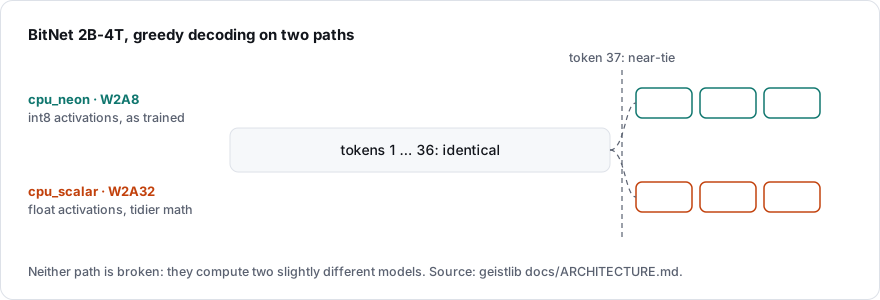
In geistlib, the consequence is written into the architecture document: for ternary weights, the scalar path checks the plumbing (weights load, shapes match, the forward pass runs). It is not the numerical gold standard.
Why does this matter for the “why another engine” question? Because it shows that ternary support is not just one more file format. It changes what “correct” means. An engine that treats low-bit weights as an add-on will keep running into questions like this one. I wanted an engine where these questions are the main topic.
What you actually ship
Small hardware cares about more than speed. Here is what it takes to run a model from the command line on a 64-bit ARM Linux board, using the official release downloads of both projects:
| geistlib v0.21.0 | llama.cpp b11696 | |
|---|---|---|
| Download for the CPU build | 2.0 MB | 13.9 MB (archive) |
| Command-line program | geist: 2.0 MB |
llama-cli: 1.3 MB |
| Shared libraries it loads | none (statically linked) | 8 files, 21.5 MB, plus the system’s OpenSSL |
| Total on disk to run it | 2.0 MB, one file | 22.8 MB, nine files |
Same, after strip --strip-all |
1.25 MB | 19.5 MB |
| Library to embed | libgeist.a: 1.6 MB |
libllama + libggml core: 6.8 MB |
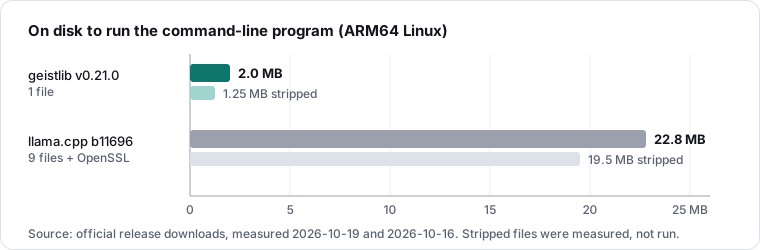
The llama.cpp total counts the files llama-cli actually loads, with one
of its eight CPU variants. llama.cpp can also be built as one static file;
I have not measured that build. The table compares what each project ships,
not what each could be, and it is not about features: llama.cpp’s files
support far more models and hardware. The point is narrower: if a device runs
one compressed model, geistlib fits it as a single file of about 2 MB, with
nothing else to install. A BitNet-only build is smaller still (Decision 4).
What the focus rules out, and what it costs
Building your own engine has real costs, and I want to name them:
- Maintenance. A C code base of this size needs tests, sanitizers, CI on several platforms and a benchmark gate on every performance-relevant change. That is a lot of work for a small team.
- Memory safety. C does not give it for free. The sanitizers and tests catch many mistakes, but they cannot prove their absence.
- Coverage. llama.cpp supports far more model families. geistlib runs Gemma 3 and 4, Llama, Qwen3, the Qwen3.5 to 3.8 hybrids and, on the main branch, Qwen3-MoE on the CPU. For any other family, use llama.cpp. Binary models are not supported yet.
- Platforms. There are no Windows binaries yet. The Metal and Vulkan GPU backends are experimental.
- Not faster everywhere. On ternary models it is ahead in
decode on every machine measured and ahead or level in prefill. But
TQ2_0decode is only level with llama.cpp, and so are thei2_sand Metal prefills.
If you need a mature, broad, well-supported runtime today, llama.cpp is the better choice. geistlib is for a narrower question: how far a whole stack can go when it is built around compressed models on hardware people already own.
Is this worth it?
I should apply the same scrutiny to my own motivation that I apply to the numbers.
“I want to understand how these models work” is not, by itself, a reason to write an engine. A fork of llama.cpp would teach me that too; bitnet.cpp and PrismML’s engine are exactly such forks, each built for one ternary format. The reasons that hold up are narrower:
- Compression and scheduling as the main topic. Low-bit weights, a compressed cache and the split across GPU and CPU are designed together, not added to an engine built for something else.
- One engine for all ternary formats. Today, each ternary format needs
its own engine. geistlib runs
i2_s,TQ2_0andPQ2_0with native kernels, in one library. - A niche where the measurements favor it. Ternary decode on every machine measured: 2.0× on the Pi, 1.14× to 1.68× on desktop and laptop CPUs, 1.15× and 1.38× on two consumer GPUs, against each format’s own engine.
- Results. The ternary oracle problem, the 0.5 percent bound on a hand-specialized forward pass: each came from being able to change one thing and measure it. Those results are useful to other engines too.
There are also costs I cannot argue away: a large C code base carried by a small team, and the time not spent contributing kernels to projects with far more users.
Weighed against each other, my answer is yes. On the most compressed models available today, one engine runs every ternary format, and on the hardware I measured, it decodes each of them as fast as or faster than the engine built for it. The same approach now has to prove itself on binary weights.
Recap
- Level 1: An inference engine loads a model and produces tokens.
- Level 2: General engines optimize for breadth. geistlib is built to make models fit small consumer hardware, through fewer bits per weight, a smaller cache and smart scheduling, with measurable design decisions.
- Level 3: Decode is limited by memory bandwidth, prefill by compute.
geistlib decodes faster than each ternary format’s own engine on every
machine measured (1.14× to 2.0×), except
TQ2_0, where it is level with llama.cpp; prefill is ahead or level everywhere. - Level 4: Low-bit weights as a first-class data type, load-time kernel binding, C23 for reach, a strict engine-versus-application boundary, and shared blocks that never ask which model they run.
- Level 5: For ternary weights, the slow reference is not the correct one. That is the kind of question geistlib exists to work on.
- What you ship: one statically linked 2 MB file (1.25 MB stripped), against about 23 MB in nine files for llama.cpp’s command-line program, and a build can carry only the one family a device needs.
- What it rules out: several GPUs per model, data-center serving and the long tail of model architectures.
- Is it worth it: yes. On ternary models, one engine decodes every format at least as fast as its own engine. The costs are real: code to maintain, and binary weights still to come.
For me, the priorities follow from that: TQ2_0 decode, the prefills
that are only level (i2_s, Metal),
binary weights, and moving weights between GPU and CPU at run time. If you want
to check any number in this article, make bench in the
geistlib repository runs geistlib and
any llama.cpp or bitnet.cpp binary it finds on the same GGUF and prints the
comparison on your own hardware.
Sources
- geistlib repository: README,
ARCHITECTURE.md
(incl. “Why C?” and “Model families: units composed of blocks”),
ROADMAP.md,
benchmark/README.md
and benchmark/headline_results.json
(BitNet Pi 5 row: 2026-10-15, bitnet.cpp
01eb415with its llama.cpp fork1f86f058). TQ2_0three-engine run (bitnetb158-large, Pi 5, 2026-08-01, including the speculative-head reading): benchmark/results/TERNARY.md.- Ternary Bonsai 2 27B
PQ2_0against PrismML-Eng/llama.cpp0082ac24(all fork builds verified at that commit), medians of three interleaved cycles, decode at a short context: M1 Max CPU and Metal on geistlib v0.21.0 (2026-10-19), Ryzen 9950X CPU (prefill with geistlib #86) and RTX 2080 Ti Vulkan (2026-10-18). Protocol, revisions, the integer-against-float A/B runs and raw data: benchmark/results/BONSAI-PRISM.md. - BitNet b1.58 2B-4T: model card (MIT license; 2B parameters, 4T training tokens, ternary weights and 8-bit activations, trained from scratch) and the technical report.
- Ternary Bonsai 2 27B: GGUF model card.
- Specialized-forward bound (BitNet 2B-4T, Pi 5, 2026-10-14): benchmark/results/SPECIALIZED-FORWARD.md.
- Layer split (#49, 2026-10-17): benchmark/results/LAYER-SPLIT.md.
- Weight streaming on Vulkan (#78, RTX 2080 Ti box, Qwen3-14B Q8_0, pp512, 2026-10-18): docs/OFFLOAD.md and the geistlib CHANGELOG.
- Architecture references in llama.cpp: lines containing
LLM_ARCH_insrc/llama-graph.cpp(12),src/llama-context.cpp(25) andsrc/llama-kv-cache.cpp(3) of release b11696 (ceefd16); 163 files insrc/models/; counted on 2026-10-17. geistlib:0b892b0f. - Binary sizes: geistlib release v0.21.0 from
geisten.net/download/geistlib/v0.21.0
(
geist-linux-arm64,libgeist-linux-arm64.tar.gz), downloaded on 2026-10-19; llama.cpp release b11696 (llama-b11696-bin-ubuntu-arm64.tar.gz), downloaded on 2026-10-16. - Geisten, “A 2B Language Model as One File on a 4 GB Raspberry Pi”.